NEC -Simple set up DID Incoming route for day including welcome messages and custom music on hold
In this scenario
Incoming DID rings to IRG1 in day
2 x Comfort message plays -Wav file or Handset recorded.
Music on hold -Wav file plays while waiting to answer.
1. Converting Uploading Music on hold and welcome messages in VRS
All these messages and MOH are stored on the VRS. the numbering can be modified to any you like, the VRS numbers used are just a suggestion
In our scenario
VRS 1- Comfort message 1
VRS2- Comfort message 2
VRS10-Music on hold file
VRS files MUST be under 2MB and formatted as an 8-Bit, 8Khz, Mono WAV file.
This equates to are 4min of MOH
Now convert your files
Open your file in in Goldwave
Click on effect/Resample and change to 8000Hz.
Then
File/Save as
Change to Save type as the Wave(*.wav)
Click on Attributes: A-Law,8000 Hz,64 kbps ,mono
And save
WebPro Programming Steps
2. Login to WebPro with the following credentials:
User Name: USER1
Password: 1111
3. Click the Login button
1. On the top of the home screen, click on the speaker icon
2. On the left sidebar, click on the “VRS Audio Up/Download” link
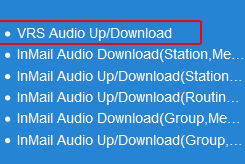
3.. In the Message No. (1-100) search bar,
For Comfort Message 1 enter 1
For Comfort Message 2 enter 2
For Muisc on Hold enter 10
4. Click the “Browse” button
5. Navigate to the audio file on your computer and select it
6. Click the “Upload” button
The greeting will become active immediately
Testing or Manually Recording Your Comfort Greetings
If you wish to Manually Record some of these messages such as the comfort message
- Your extension must be in a class of service that allows VRS recording
- Check Class of service of phone 20-06
- and make sure that class of service has 20-07-13 enabled
Record greeting
Lift hand piece (you can use speaker but the quality of recording is better on the handpiece)
Dial 616 7 001 Comfort greeting 1 (use 3 digit numbering for SV9100)
Dial 616 7 001 Comfort greeting 2 (use 3 digit numbering for SV9100)
Start recording at the “Beep”
Press the # to end recording & replay.
Testing Your Comfort Greetings
To confirm that the file has loaded properly, perform the following steps from
1. Lift the Handset of Extension 101 or press the “Speaker” key
2. Dial “616 5 001” to hear 1st comfort greeting
Dial “616 5 002” to hear 2nd comfort greeting ( used
Dial “616 5 010” to hear Music on hold
3. The message will begin to play
Your Messages are now ready to be applied in the phone system.
Log out of Web Pro and relog in again under either nec-i or tech
Music on Hold
10-04-01- set music source selection to VRS.
10-04-02 use VRS No 10
We are using DID routing in this case for SIP and going to send call to IRG 1 and play 2 comfort messages
22-02-01
Set all trunks to DID
22-09-01 Set to 8 digit mapping for your relevant Trunk group
22-11-01 set LAST 8 digits of phone number.
22-11-04 set to Busy/No Answer
22-11-05 set to Transfer target 1 ( IRG 1)
22-04 add members to incoming ring group 1 and delay ring if needed.
Now to add comfort messages
PRG 22-14-01 Set the start time to play the greeting.
PRG 22-14-02 Set the VRS Greeting you wish to play (in this case Comfort message 1 VRS1)
PRG 22-14-03 Set the number of times you wish to play the greeting.
PRG 22-14-04 Set the VRS Greeting you wish to play (in this case Comfort message 2 VRS1)
PRG 22-14-05 Set the number of times you wish to play the greeting.
PRG 22-14-06 Set to play the music on hold files you have already uploaded.
PRG 22-14-(04-07) Optional
PRG 22-01-11 Set Time between message 1 playing and message 2
Test inbound calls
Related Articles
NEC - Multiple external Music on hold sources SL2100
NEC Multiple external Music on hold sources SL2100 You require 2 082U cards Use Pins 2,7 on both cards for input The BGM port is the 2nd 082U card The Music on hold 1st 082U card Set Lines to DID 22-02 Set the DID translation to either Music on Hold ...NEC SV9100 SL2100 Basic DDI Programing Overflow to VM with day night messages
This article is for ISDN / SIP trunks ONLY , Analogue trunks can not use Direct Indial Direct Indial It is recommended for all SIP trunking that Direct Indial is set up for all channels, even if you only have one number, this prevents phish attempts ...NEC SV9100 SL2100 Back Ground Music from MoH source
Back Ground Music External source can only either be MoH or BGM , NOT BOTH. Work around: Set your External source as BGM , then program the trunks to use BGM as MOH. SL2100, select your Combo ( 082 ) card slot number where you have your Music ( Pins ...NEC SV9100 , SL2100 Set MoH to use uploaded message
Music On Hold – upload audio file You can upload one Music on hold file Set MoH source selection to VMDB Set Tone selection ( suggest using 10 ) Set web access credentials Set in PRG 90-02 for login level to allow the upload of the Music on hold ...NEC -Changing operator Destinations using Day/Night mode key
Changing operator using Day/Night modes- handy for hotels with after hours going to offsite answer service Giving extensions the ability to make an internal call that routes as if it were an incoming DDI call Loopback Use: The SL2100 has a built in ...