Yeastar - Manage Call Recording
Manage Call Recording Files
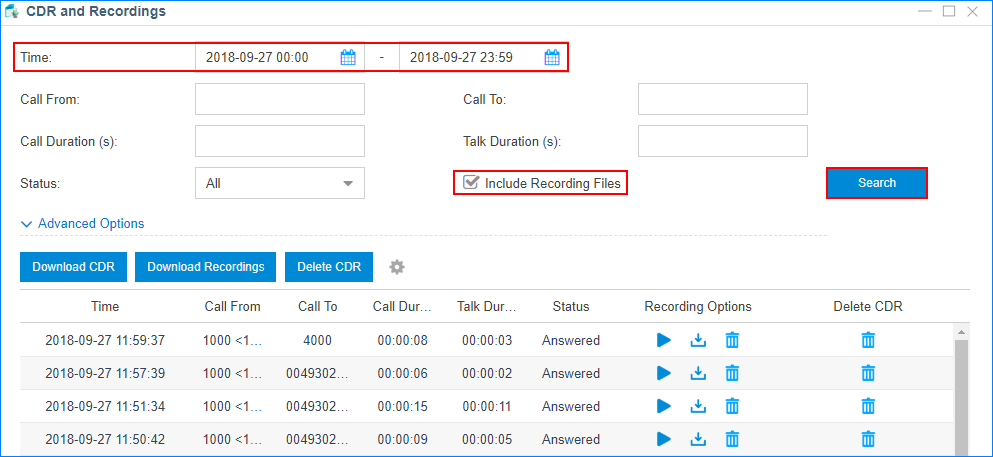
Go to CDR and Recordings in YCM to search, play, download, or delete the recording files.
Search Recording Files
- Set the search criteria Time.
- Enable Include Recording Files to filter the records that have associated recording files.
- Optional: Set other search criteria.
- Click Search.
Download Searched Recording Files
- Search Recording Files
- Select Download Recordings

NOTE: You can download a maximum of 500MB per recording files or maximum of 100 recording at a time.
Download a Recording File
Select  behind a recording log to download the recording file.
behind a recording log to download the recording file.Play a Recording File
Select  to play the recording file on web or play to an extension.
to play the recording file on web or play to an extension.Delete a Recording File
Select  behind a recording log to delete the recording file.
behind a recording log to delete the recording file.Related Articles
Yeastar - Recording Permissions to Users - S&R
Recording Permissions to Users - Search & Replay By default, only the Administrator role has permission to manage the call recording files. The super administrator can grant recording permission to extension users and allow the users to play, ...Yeastar - Call Recording Minutes
Yeastar Call Recording Minutes Understanding Yeastar Call Recording Yeastar Call Recording Minutes are allocated to the system Call Recording Minutes account for both the recording and the storage of the recordings on the local drive of the system ...Yeastar Training - Module 4- voicemail, recording , transcriptions
Download training Decks CPD-Yeastar Module 4 - Call Transcription Using Yeastar Built-in CPD-Yeastar Module 4 – Recording Archiving to AWS S3 Bucket CPD-Yeastar Module 4 – Recording Archiving to Google Cloud CPD-Yeastar Module 4 – Using Voicemail ...Yeastar - Backup P-Series Cloud PBX
Backup P-Series Cloud PBX Capture Backup Log in to Yeastar Central Management, Login as Administrator to the PBX instance -Take a backup of Instance. You must do this within the instance and not YCM portal (YCM does not give a download file option) ...Yeastar - CRM Integration
Yeastar CRM integration Pre Configured Templates Yeastar CRM Integration is designed to facilitate quick integration between your PBX and CRM account. Complete the integration in minutes with a step-by-step configuration wizard and enjoy rich ...