YEASTAR - Unable to add SIP trunk to PBX
Unable to add SIP trunk
Issue
When trying to create a SIP trunk in Yeastar and you are unable to access the +Add button is greyed out.
Allow Trunk Edit
1. Log into your YCM portal -https://ycm.yeastar.com/login
2. Search PBX and go to Details
3. Within Details PBX Information scroll to bottom to System. The option "Trunk Configuration Access" will be unchecked
4. Check the box and Save
5. Log into PBX and +Add will now be available
Bulk Edit
You can edit all your PBX using Bulk Edit
1. Log into your YCM portal -https://ycm.yeastar.com/login
2. Select check box next to heading status, All PBX will be selected
3.Select "Bulk Edit"
4. Enable "Bulk Edit" and Check the "Trunk Configuration Access" box followed by Save
All PBX's will now have "Trunk Configuration Access" feature allocated

You can only have a maximum of 50 PBX display on a page at anytime, If you have more than 50 PBX, Select 50/Page to display and repeat above Bulk Edit process on each page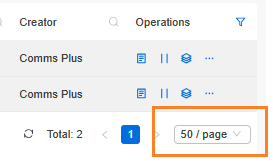
Related Articles
Yeastar - CPD FDX SIP Trunk Configuration
CPD FDX SIP Trunk Configuration The following is for configuring FDX SIP trunks into Yeastar PBX Requirements: 1. FDX SIP Trunk credentials 2. Yeastar PBX Configuring Yeastar PBX 1. Add SIP Trunk in Yeastar PBX 2. Configure SIP Trunk Parameters Basic ...Access4 TLS trunks on Yeastar
When Connecting TLS trunks from Access4. There is a deployment guide attached to this article from Access4. The main difference from UDP/TCP access4 trunks is the FQDN used as below. Access4 TLS/Encrypted trunks are a value add service, only use this ...Yeastar - PBX to Yeastar NeoGate TA800 Gateway (Peer Trunk Mode)
Yeastar P-Series to TA800 Complete Peer Trunk Integration Guide Document Purpose This document details a complete integration blueprint to deploy a Yeastar TA800 8-Port FXS gateway alongside a Yeastar P-Series PBX without using extension licenses. It ...Yeastar - Public IP for whitelisting with ITSP & Yeastar SBC
Public IP for whitelisting with ITSP The following are the SBC IP addresses for the Yeastar Cloud PBX. The addresses can be whitelisted by ITSP for Yeastar access. Yeastar SBC Servers There are 2 server for the Yeastar Cloud Solution SBC Server When ...Yeastar P-Series Self-Hosted Migration to Different Platform
Yeastar P-Series Self-Hosted Migration to Different Platform On the current Yeastar P Series PBX Check for new firmware and if available upgrade the Yeastar to the latest firmware Select Maintenance – Upgrade – Check for New Firmware Select Upgrade ...