Yeastar - Download or upload custom Auto Provisioning templates
Yeastar P-Series Cloud Edition support downloading and uploading of auto provisioning
custom templates, which allows template reuse across multiple PBXs without the need
to recreate templates manually.
Important: The
downloaded template files are encrypted and cannot be opened directly; they can
only be uploaded and parsed by the PBX.
- Requirements
- The firmware of Yeastar P-Series Cloud Edition is 84.19.0.70 or later.
- Procedure
- Log in to PBX web portal, go to Auto Provisioning > Resource Repository > Custom Templates.
- To download custom auto provisioning templates, do as follows:
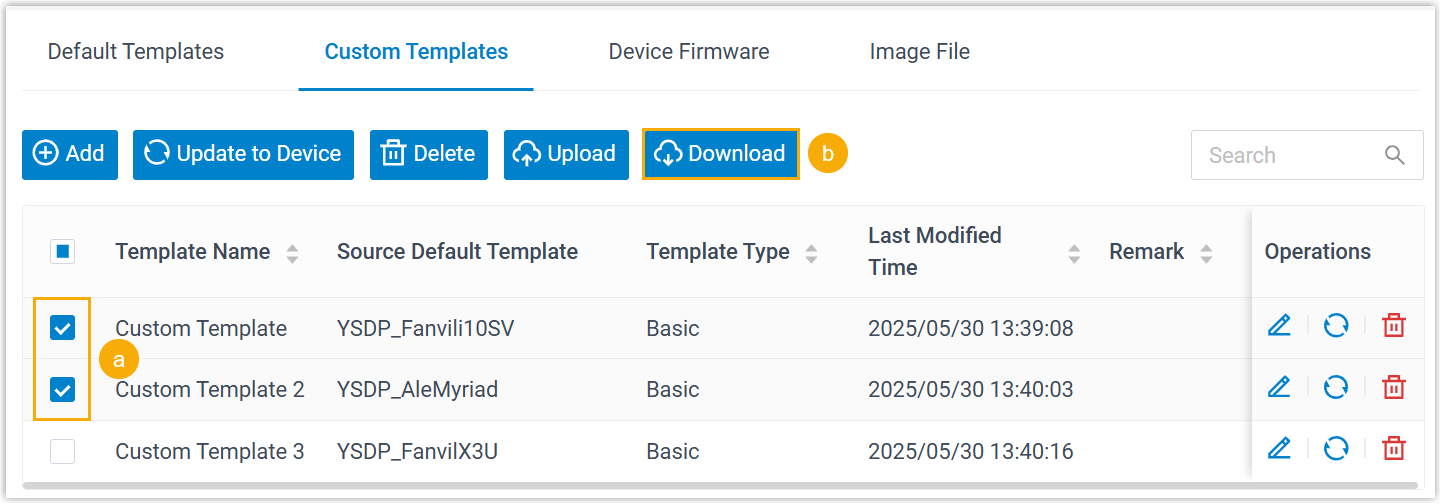
- Select one or more desired templates.
- At the top of the list, click Download.
The template files are downloaded to your computer in
.custformat.
- To upload a custom auto provisioning template, do as follows:
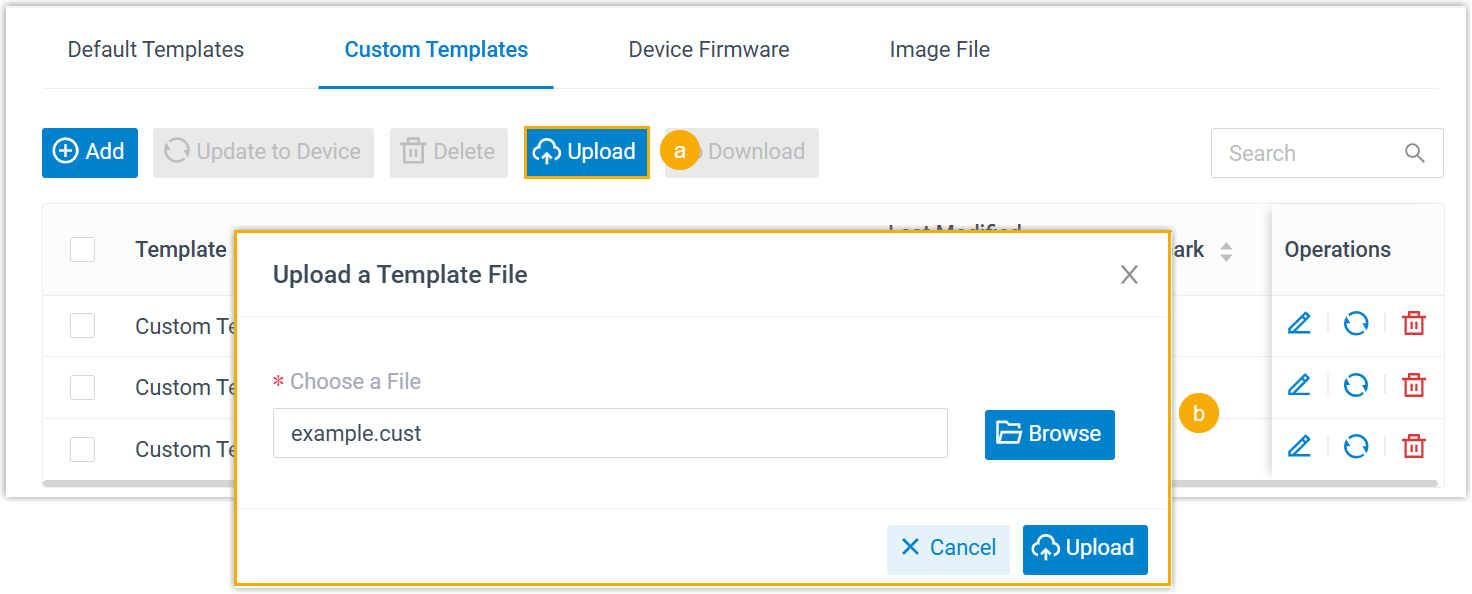
- At the top of the list, click Upload.
- In the pop-up window, click Browse to select the downloaded
.custtemplate file, then click Upload.The template is uploaded and displayed in the list.
Related Articles
Yeastar - Update a Default Auto Provisioning Template
Update a Default Auto Provisioning Template Yeastar P-Series PBX System regularly provides new template versions to release new features and fix bugs. You can check if a new template is available, and decide whether to update the default template. ...Yeastar - Loading Custom Config file for Avaya J series Handsets
File attached to this KB article or download from here. Upload this file to Yeastar Custom Templates. When Auto provisioning, select this template This does not Auto provision handset, Methods for Provisioning are: Copy the provisioning link, add to ...Yeastar - Avaya Custom Configuration File - Latest File_12_09
Avaya Custom Configuration File - Latest File The latest Custom Configuration File for Avaya J series can be downloaded. As updates are release features are added to the configuration file to expanding on all previous additions. Links to Guides for ...Provisioning Grandstream devices on Yeastar
Yearstar setup From the Yeastar instance. Goto Auto provisioning>Phones>Add Enter details Select Grandstream as Vendor Select Handset Model Select template Assign Extension Copy the Provisioning link URL Click Save Repeat for additional handsets, ...Yeastar- Provision & Using Avaya J-series handsets
Provision & Using Avaya J Series handsets To provision Avaya J Series handsets to Yeastar PBX the following links will guide you through teh install of the custom file and configuring auto provisioning. Latest updates on custom config file can be ...