Linkus Mobile Client Guide
Linkus Mobile Client
Quick Start Guide
Table of Contents
Download Linkus
Linkus Mobile Client integrates iOS and Android mobile phones with Yeastar IPPBX. It enhances efficiency with consistent in-office experience and powerful collaboration features. Never miss a call when working away from the office. And reduce mobile voice charges with VoIP phone calls made through the company PBX.
Click to Download Linkus
Log in Linkus
After receiving the Linkus Welcome Email from your administrator, use mobile phone to scan the provided QR code to quickly log in Linkus.
Unified Directory
Extensions
Synchronize extension information within your organization. Quickly and easily find the desired colleague by searching name or number.
Phone
Synchronize local contacts on your mobile phone. Quickly add phone contacts to company contacts or personal contacts.
Contacts
Synchronize a central, company-shared contacts list to streamline resources and facilitate business tasks.
Build an exclusive personal directory for speed dial.
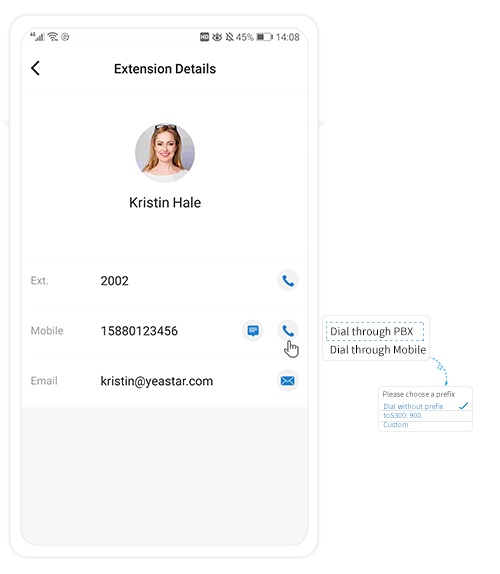 Flexible Dialing Modes
Feature-rich Call Operations
Easily click to make, hold, mute, transfer, and record a call to any phone number or extension.
Instant Messaging for Instant Result
Have an instant sharing of ideas with one or more colleagues by sending texts, images, files, and emojis.
Rich Presence Information
Customized presence message and call forwarding rule allow your colleagues to know when and how best to contact you.
Initiate a Multi-party Call
Start a call with one or more participants to work on a subject that requires immediate attention.
Host a Conference
Host a regular conference call and invite other participants to join. Up to 9 participants can be on the conference call.
Access Voicemails and Recordings from anywhere
The voicemails and recordings are synchronized on Linkus and Yeastar PBX system. You can check voice messages on Linkus effortlessly.
Related Articles
Linkus Desktop Guide
Linkus Desktop Client User Guide Table of Contents Download Linkus Log in Linkus Unified Directory Flexible Dialing Modes Dual Calling Modes: CTI Mode and Softphone Mode Initiate a Multi-party Call Feature-rich Call Operations Instant Messaging for ...Yeastar - Log in to Linkus Web Client
Log in to Linkus Web Client This topic describes how to log in to Linkus Web Client via a link in Linkus welcome email. Prerequisites Make sure you have received a welcome email. Note: The login can only be used once Procedure Access your mailbox and ...Yeastar-Why linkus app doesn't receive calls in background mode
Why linkus app doesn't receive calls in background mode Introduction This article will illustrate push mechanism for mobile linkus app when it is in background and mainly share checklists for the problem why linkus app doesn't receive calls after it ...Linkus Web Client Call Centre Console Guide
Linkus Web Client Call Center Console User Guide Table of Contents Call Center Console Overview Call Center Console components Wallboard Overview Prerequisites What you can do on Wallboard Queue call metrics View Call Metrics on Wallboard ...Linkus Web Client Operator Console Guide
Linkus Web Client Operator Panel User Guide Table of Contents Operator Panel Overview What is Operator Panel What you can do on Operator Panel Permission requirements Access Operator Panel Prerequisites Procedure Operator Panel Layout Inbound & ...