Linkus Desktop Guide
Linkus Desktop Client
User Guide
Table of Contents
Download Linkus
Coordinated with Yeastar IPPBX, Linkus Desktop Client offers you enterprise-grade telephony features from your computer desktop. Linkus Desktop Client gives you softphone, instant messaging, presence, and file sharing facilities. Just communicate and collaborate seamlessly and efficiently.
Click to Download Linkus
Log in Linkus
After receiving the Linkus Welcome Email from your administrator, copy the provided link to quickly log in Linkus.
Unified Directory
Flexible Dialing Modes
Dual Calling Modes: CTI Mode and Softphone Mode
Softphone Mode (For users without deskphone)
Make and receive calls on Linkus Desktop Client. Stay connected anywhere anytime.
CTI Mode (For users with deskphone)
Control call operations of IP Phone on Linkus Desktop Client. Release your hands and offer familiar desktop experience.
Initiate a Multi-party Call
Start a call with one or more participants to work on a subject that requires immediate attention.
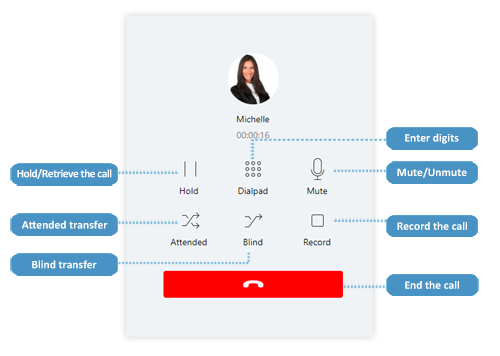 Feature-rich Call Operations
Instant Messaging for Instant Result
Have an instant sharing of ideas with one or more colleagues by sending texts, images, files, and emojis.
Note: Instant Messaging is supported only when your organization uses Yeastar S-Series VoIP PBX, K2 IPPBX, or Cloud PBX.
Rich Presence Information
Access Voicemails and Recordings from anywhere
The voicemails and recordings are synchronized on Linkus and Yeastar PBX system. You can check voice messages on Linkus effortlessly.
Related Articles
Linkus Web Client Operator Console Guide
Linkus Web Client Operator Panel User Guide Table of Contents Operator Panel Overview What is Operator Panel What you can do on Operator Panel Permission requirements Access Operator Panel Prerequisites Procedure Operator Panel Layout Inbound & ...Linkus Mobile Client Guide
Linkus Mobile Client Quick Start Guide Table of Contents Download Linkus Log in Linkus Unified Directory Flexible Dialing Modes Feature-rich Call Operations Instant Messaging for Instant Result Rich Presence Information Initiate a Multi-party Call ...Yeastar-Using the Linkus Desktop Client to control a handset
The Linkus desktop client can be either used as a softphone or a PC application to control your desk phone By selecting the phone instead of your desktop client , the linkus will now work hand in hand with the phone instead of as a soft phoneLinkus Web Client Call Centre Console Guide
Linkus Web Client Call Center Console User Guide Table of Contents Call Center Console Overview Call Center Console components Wallboard Overview Prerequisites What you can do on Wallboard Queue call metrics View Call Metrics on Wallboard ...Yeastar - Log in to Linkus Web Client
Log in to Linkus Web Client This topic describes how to log in to Linkus Web Client via a link in Linkus welcome email. Prerequisites Make sure you have received a welcome email. Note: The login can only be used once Procedure Access your mailbox and ...