Yeastar- Outbound caller ID
Outbound caller ID
- Emergency Numbers
- Outbound Route
- Trunk
- Extension
Priority of outbound caller ID
When an extension user makes an outbound call, the system first identifies if the call is an emergency call, then sends an outbound caller ID by the following priority (from the highest to the lowest).
- Extensions' emergency outbound caller ID
- Trunk's emergency outbound caller ID
- Outbound Route caller ID
- Trunk's outbound caller IDs that are associated with extension users
- Trunk's general outbound caller ID
- Trunk's default phone number that is provided by the carrier
- Extension's caller ID
Customize outbound caller ID for a trunk
- Log in to PBX web portal, go to Extension and Trunk > Trunk, edit the desired trunk.
- Click Outbound Caller ID tab.
- In the General section, configure a general Outbound Caller ID and Outbound Caller ID Name for the trunk.
- Click Save and Apply.
The general outbound caller ID and caller ID name will be displayed on the called party's device when users make outbound calls through this trunk
Customize outbound caller IDs for extensions
You can set up an outbound caller ID for a specific extension based on a trunk, so that an associated caller ID is sent out when the user calls out.
- Log in to PBX web portal, go to Extension and Trunk > Trunk, edit the desired trunk.
- Click Outbound Caller ID tab.
- In the Outbound Caller ID List section, click Add, and configure outbound caller IDs for extensions by different methods.
- To bind consecutive outbound caller IDs to consecutive
extensions with one-to-one correspondence, select Outbound Caller
ID Range and configure the following settings:
- Outbound Caller ID Range
- Extension Range
- Outbound Caller ID Name
- Default DOD Label
- Click Save and Apply.
When extension users make outbound calls through the configured trunk, the associated
outbound caller IDs will be displayed on the called party's device.
Customize outbound caller IDs based on dialed numbers
When calling to multiple areas, you may need to display pre-defined local number for the area code you are dialling. In this case, you can configure outbound caller IDs based on the dialed numbers.
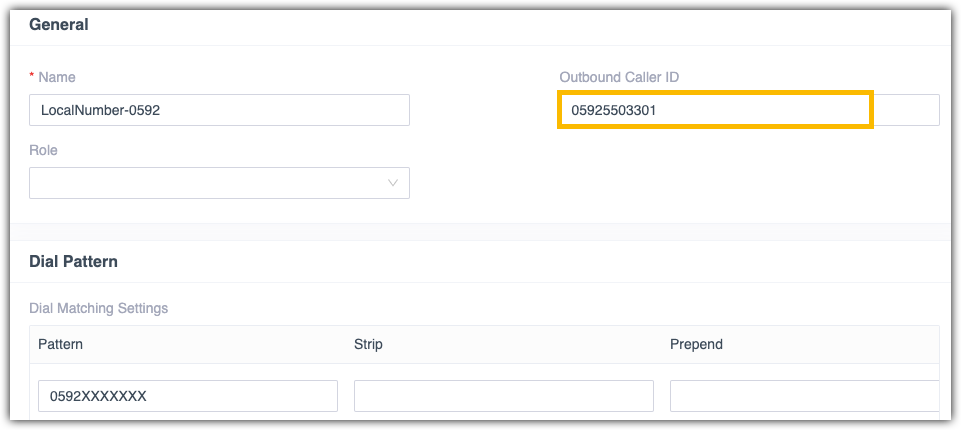
The following instruction describes how to display a custom outbound caller ID 05925503301 when users call to local numbers that have area code 0592.
- Log in to PBX web portal, go to Call Control > Outbound Route, edit the outbound route that is for local calls with area code 0592.
- In the General section, enter the custom caller ID in
the Outbound Caller ID field.
- Click Save and Apply
Related Articles
Yeastar-Changing Caller ID outbound on Access 4 Trunks
Access4 TLS trunks on Yeastar Changing caller ID outbound on Yeastar using Access 4 trunks Log in to Yeastar Portal Extension and Trunk Trunk You will see our Trunk user name and password , this by default is what is being sent outbound To change ...Yeastar- Outbound Caller ID
In Yeastar P-Series Cloud Edition, you can configure outbound caller ID based on the following features: Emergency Numbers Outbound Route Trunk Extension Customize Outbound Caller IDs This topic describes different ways to customize outbound caller ...Yeastar- Caller ID outbound prioity Table and customisation
In Yeastar P-Series Software Edition, you can configure outbound caller ID based on the following features: Emergency Numbers Outbound Route Trunk Extension Customize Outbound Caller IDs This topic describes different ways to customize outbound ...Yeastar - PBX to Yeastar NeoGate TA800 Gateway (Peer Trunk Mode)
Yeastar P-Series to TA800 Complete Peer Trunk Integration Guide Document Purpose This document details a complete integration blueprint to deploy a Yeastar TA800 8-Port FXS gateway alongside a Yeastar P-Series PBX without using extension licenses. It ...Yeastar - Connecting Grandstream HT802 ATA adapter
Grandstream HT802 to Yeastar Setup Yeastar User In Yeastar admin portal, add user for the ATA and configure as below: Assign Extension Number and Name, take note of Registration Name and Password, use auto generated or set a new password. Disable ...