NEC- turn off message waiting feature
NEC - Turn off message wait lamp
Message wait form another extension can be an annoying feature
To leave a message waiting, the user will call an extension, and press 0 or press the “MW” soft key under the display to activate the message waiting lamp on the extension called.
When a message waiting light is placed on an extension there are two ways to clear it.
To return the message waiting by dialing *0
or go off hook and dial 773 which will clear the all message waiting notifications on the extension
.
How to Disable Message Waiting
You can enable/disable this thru class of service
In 20-06 you can assign a class of service to individual handsets then ,
1. Go to Program 20-13-07 uncheck boxes 01 and 15
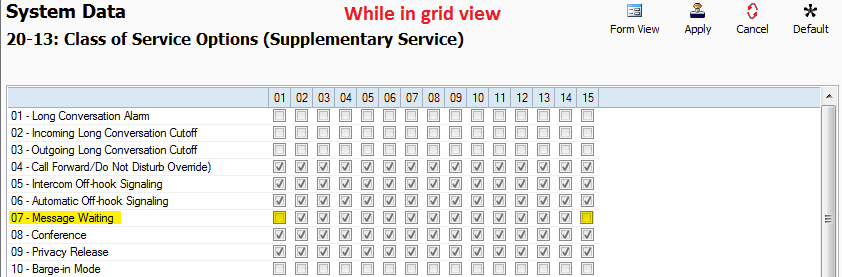
4. Go to Program 11-16: 1-digit Service Code Setup
5. Remove the value of 11-16-07: Message Waiting and leave the field blank
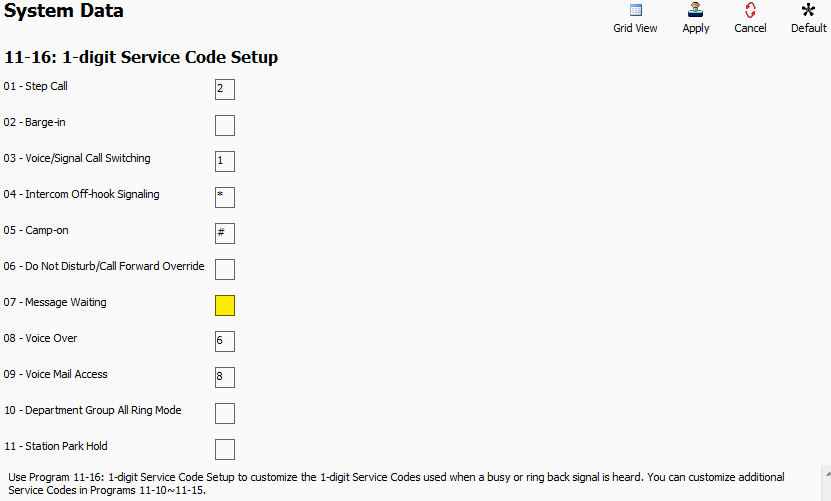
6. Apply and upload changes
Related Articles
NEC SV9100 New Install Best Practice
Best Practice for new Installs The SV9100 CP20 has introduced portal mode on the DT900 handsets , all DT900’s will show the following screen by default. The 8 Icons are basically speed dials that are hard coded to the handset (not in system ...NEC - Turn off Preview Dial
To turn off the preview dial , so the phone goes straight to speaker phone and dials check which Class of service your phone is in (in this case 1) 20-08-20 got to your class of service and checkNEC SL2100 Swapping Extenion via handset with feature code
NEC- Swapping Extensions on system via handset with feature Code 95-05 add a pin number to the handsets 20-13-42 make sure extension data swap is enabled in your class of service 11-15-14 remove 740 from modem access as it no longer relevant and put ...NEC SL2100 Telstra Business SIP
NEC SL2100 Telstra Business SIP TIP: North bound issues, try setting registration from the OneAccess unit to the carrier using Secure SIP in the customer portal, this will hide any SIP traffic from SIP ALG in routers:NEC SV9100 SL2100 -- ST500 APP
How to program a ST500 APP to a SL2100 / SV9100 Pre-requisite: A Static Public IP for the NEC system Port forward "Register Port" on your external router to the LAN address of the CPU (10-12-09) Change the "Register Port" PRG 84-20-01 from 5070 to a ...